Your external drive just unmounted without warning. DriveDx sits in the background and sees the signs before you do.
Apple Silicon, no Rosetta
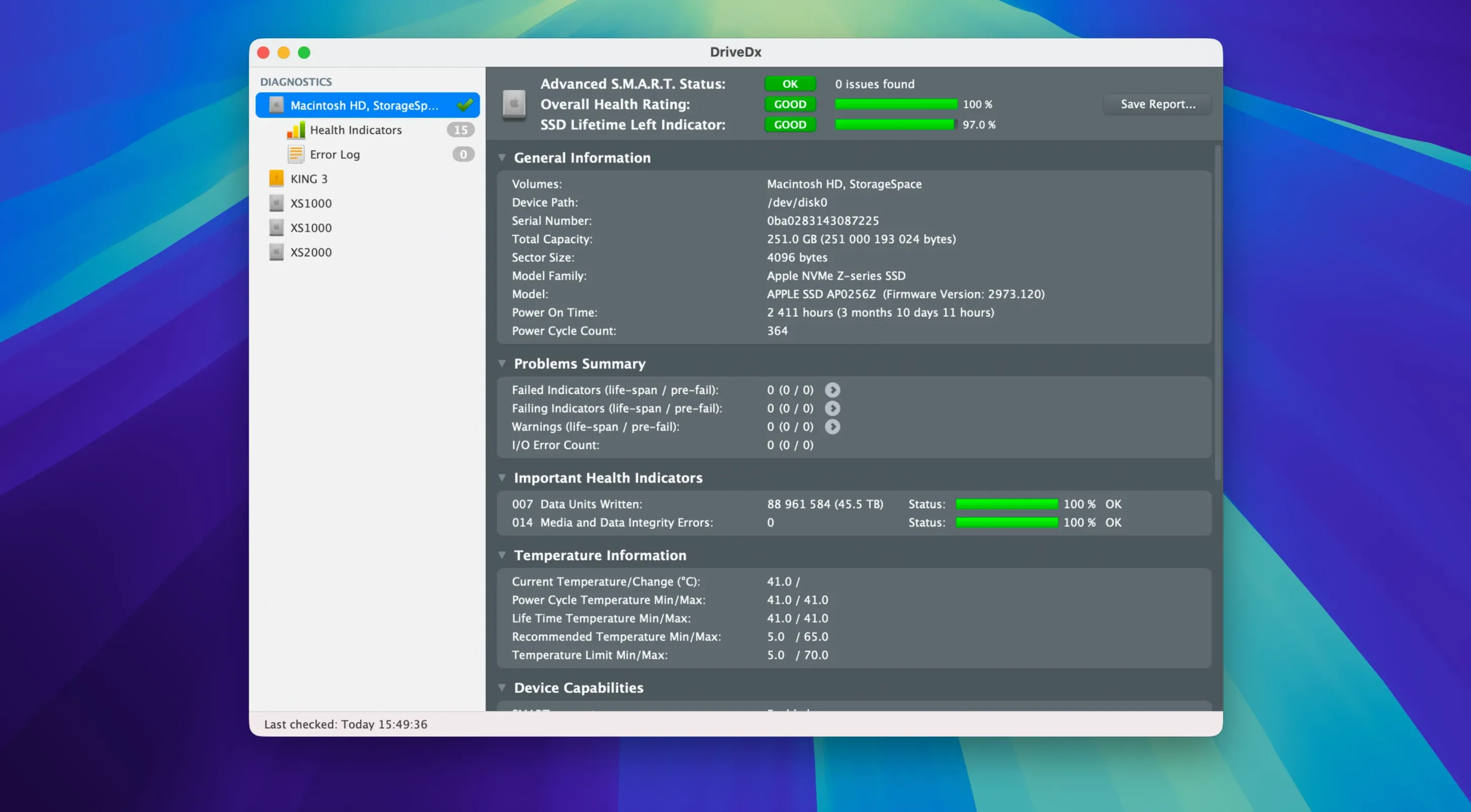
Does it work on Apple Silicon without Rosetta? Yes — the driver installer in 1.12.1 no longer needs it. Will it run on Sonoma? This release is built for it. The app uses heuristic algorithms to move beyond a simple OK/failed readout. It shows warning and failing states, giving you time to act. Short and full self-tests are built in. Periodic background checks mean you don't have to remember to look.
Drive monitoring that thinks ahead
Is it safe to let a utility run in the background all day? The monitoring is intentionally light. It polls SMART counters and NVMe health indicators — not the drive's contents. There’s no constant disk churn. The notification thresholds were also recalibrated in 1.12.1, so minor fluctuations stay quiet and actual warnings arrive earlier.
People often ask whether it handles both SSDs and spinning hard drives equally well. The answer sits in the details it tracks: for SSDs, wear-leveling count and total bytes written; for HDDs, reallocated sectors, pending bad sectors, and spin-up time. Different physics, same clarity.
Another question that comes up is about reading third-party enclosures. If the bridge chip passes SMART data through — and most modern USB and Thunderbolt enclosures do — DriveDx sees it. No extra driver tinkering needed after the initial install.
A morning check, start to finish
Say you run a studio Mac with two external media drives and an internal SSD. DriveDx lives in the menu bar. Its icon stays gray and unobtrusive until it has something to say.
You open the app once a week — Friday morning, while coffee brews. The main window shows three drives. The Samsung SSD reports 96% health, a routine read after eighteen months of heavy writes. The older RAID enclosure spins up with a warning indicator on reallocated sector count. Not failing yet, but the trend line on the attribute graph slopes upward over the last month.
You run a short self-test on that drive from within the app. It completes in two minutes and confirms the drive is still operational. DriveDx calls the state “Warning,” not “Failed.” You have time to clone the volume and order a replacement before a deadline turns into a recovery scramble. That’s the whole point.
Back in the menu bar, the icon returns to gray. The background daemon will check again in a few hours. You won’t think about it until it needs to be thought about.
Multi-disk editors
Video editors and photographers with multi-disk workflows notice it first. A single failing external drive can stall Final Cut libraries or Lightroom catalogs without warning. DriveDx flags the drive before the filesystem gives up.
System administrators who manage fleets of office Macs get a single pane for drive health across machines when combined with remote monitoring tools. The early warning states let them schedule replacements during maintenance windows, not after a ticket lands.
Even a writer with one Time Machine disk gains something. SSDs in particular can degrade silently — no click, no whine — until a save dialog fails. The wear indicator alone is worth the glance once a month.
The diagnostic algorithms got tighter in this maintenance release. DriveDx watches for patterns that precede failure, not just the failure itself.