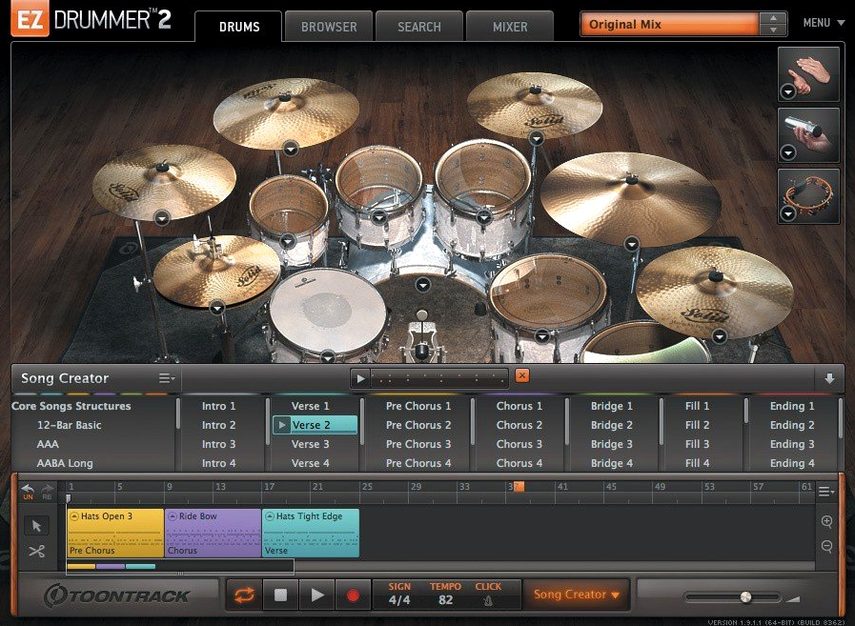
You have a verse idea. You open EZdrummer, pick a basic groove, and tap your kick-snare pattern on the keyboard. The browser finds it. A few clicks later you have a full arrangement with fills and stops, all while the chorus melody is still in your head.
- Tap2Find. Search the groove library by tapping a rhythm instead of browsing names.
- Song Creator. Drag a groove in; it builds an intro, verses, choruses and fills as a single song track.
- Edit Play Style. Change a groove's intensity, complexity or hand selection in real time without swapping MIDI.
- Grid Editor. Write patterns from scratch or nudge hits when a groove is close but not quite right.
Seven kits and a percussion set cover the ground. Cut, copy and paste song parts to build structure fast. It stays out of the way so you stay in the song.
Speed is uneventful, which is the best thing you can say about drum software. A kit loads in a few seconds on Apple Silicon. On Intel, give it a beat longer. Once the samples are in memory, switching between kit pieces is immediate. Playback stays tight even when the song track is dense with tempo changes and time-signature shifts. I have run it alongside a modest stack of synths and effects without the fan spinning up. Memory use sits around 1.5–2 GB for a full kit with bleed channels, lower if you stick to the streamlined mixer preset.
Stability is similarly quiet. Version 3.1.2 fixed a pair of annoyances that could trip you mid-session: hi-hat pedal CC data sometimes dropped during song-track recording, and toggling Solo or Mute in the mixer would occasionally clear the opposite recall state. Both are gone now. The app hasn't crashed once in the weeks I've pushed it through quick arrangement sprints.
Tap rhythms
New users treat Tap2Find like a search bar. They type "four on the floor" and get nothing. Tap2Find wants rhythm, not words. Tap your kick and snare on the keyboard or click the on-screen pads. The browser responds to what you play, not what you name it.
Another common stumble: dragging a groove straight into the DAW timeline before letting Song Creator arrange it. You end up with a single bar looping and wonder where the fills went. Drop the groove into the Song Creator first. Let it build the skeleton, then drag the song track out. You can edit it further in the Grid Editor afterward.
People also overlook the percussion kit. It sits in the same library browser, but only if you switch to the percussion view. If you need shaker, tambourine or hand claps, they are there — just not in the main kit list.
Infinity Grid snap
Version 3.1.2 brought internal improvements for the Infinity Grid EZX, so if you use that expansion the response is snappier and the grid behavior more predictable. The standalone icon and the project icon on Mac now follow the macOS Tahoe style. Small thing, but it sits cleanly in the Dock next to everything else.
That same update also made the platform ready for EZX packs released from Q4 2025 onward. If you plan to add expansions down the line, staying on 3.1.2 keeps the door open.
MIDI drag
EZdrummer runs as a plug-in inside any DAW that hosts AU or VST3. It also works standalone. In a DAW, dragging the song track to a MIDI lane is a one-move operation. From there you can tighten hits in the piano roll, swap out a snare articulation, or layer external samples underneath. The plug-in syncs to host tempo and time signature without extra setup.
Bandmate is the quiet bridge to collaboration. Drag a guitar riff or a vocal scratch track onto it, and EZdrummer suggests patterns that fit the transients. It reads audio and MIDI the same way, so you can feed it a bass line from another instrument plug-in and get drum ideas that lock in. The suggestions are starting points, not final arrangements, but they save the blank-page silence.