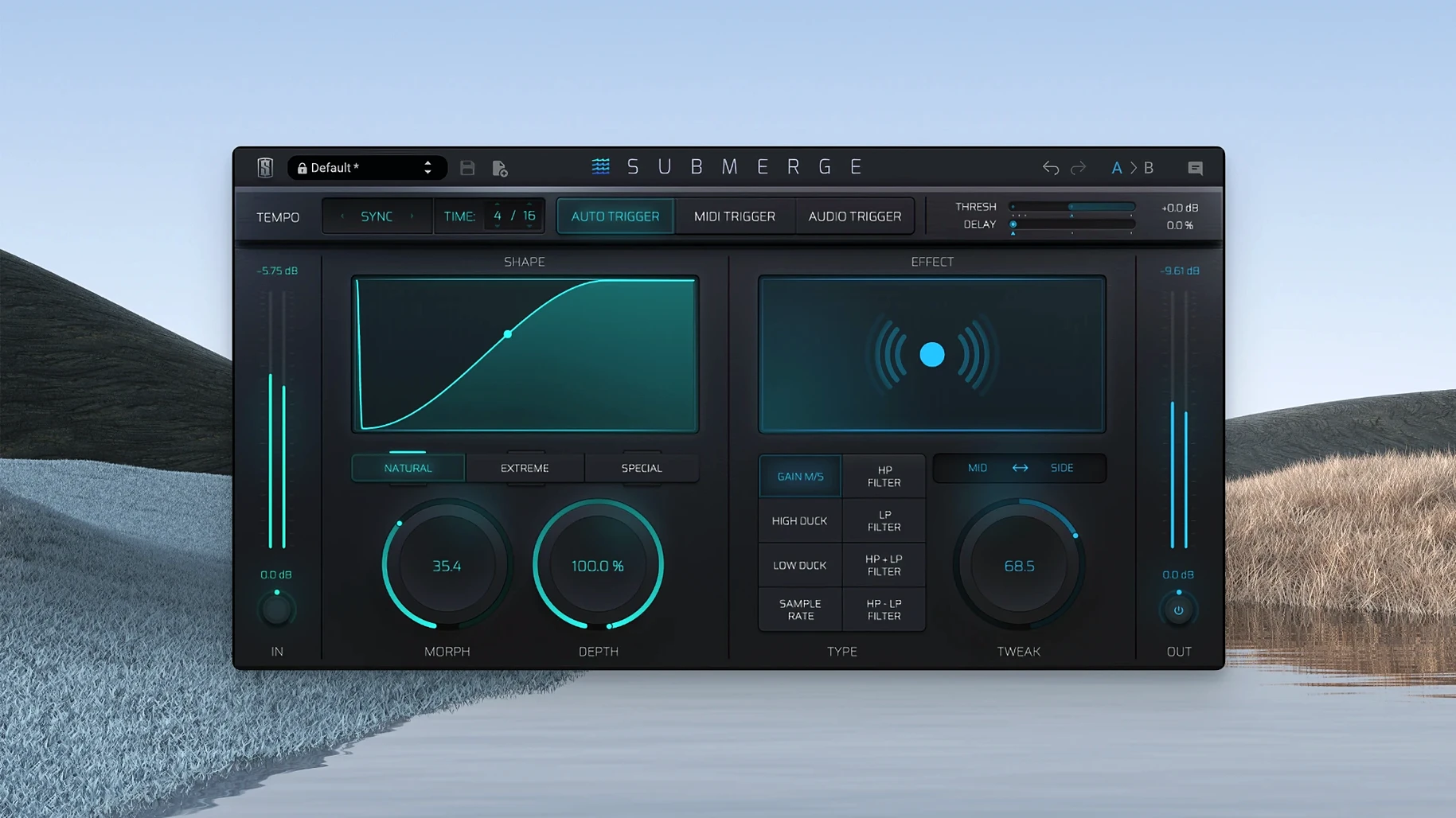
Three trigger modes decide when the ducking starts: auto, MIDI or an audio sidechain.
Threshold, Speed, Morph, Depth, Tweak. Curves go natural, extreme or custom. Mid/Side puts the effect only on the center or only on the sides. Sample-rate reduction and high- and low-pass filters add texture beyond a volume dip.
One tool, a narrow purpose, no pretending otherwise.
Beginners often treat Submerge like a compressor. They push the threshold down and wait. The gain reduction meter moves. Nothing changes.
The plug-in needs a trigger. In auto mode, that trigger is the project tempo. If the DAW transport is stopped, auto mode stays silent. Hit play and the rhythm appears.
MIDI mode confuses people who feed it notes but forget to set the note range. A kick drum MIDI pattern on C1 does nothing if Submerge is listening on C3. Check the trigger note in the lower corner. Match it to your pattern.
Audio sidechain mode is the most familiar path, but some users route the sidechain signal and then leave the plug-in in auto mode. Two modes running, zero results. The mode switch is not a blend knob. Pick one.
Another early mistake: stacking Submerge on a track that already has heavy compression. The two processes fight. The compressor tries to keep level steady. Submerge tries to move it. Place Submerge last in the chain, or at least after the compressor, unless you want a choked, fluttering sound. Sometimes you do. But know why.
Depth past 70%
Open the plug-in and the Depth knob sits at 50%. That is mild. Move it past 70% for music that needs the kick to clear space. EDM, trap, anything with a dense low end wants more.
The Speed control is worth a deliberate adjustment. Faster speeds create a tight, almost clicky envelope. Slower speeds produce a breathing movement. For a pad or a sustained bass, try a speed around 200 ms. For a pluck or a short stab, drop it to 20 ms or less.
The Tweak knob is easy to ignore. It shifts the shape of the attack and release without changing their timing. A small nudge clockwise can make the ducking feel more aggressive, even at the same speed. Useful when the basic curve is right but the attitude is wrong.
Shift-click inverts the curve. Ducking becomes pushing. Set it up on a hi-hat bus and trigger it from the snare. The hats jump forward on every snare hit. Subtle, but it gives a loop a forward lean that EQ alone cannot.
For anyone searching for a slate digital torrent to test the plug-in, the installer from the verified source includes version 1.0.5, which runs on Apple Silicon under macOS 11 and later. That version is the one described here. No earlier build has the full set of trigger modes working correctly.
Version 1.0.5 fixed a timing drift in auto mode that appeared at tempos below 80 BPM. Before the fix, the ducking envelope could slip by a few milliseconds over several bars. Now it stays locked. For slow, spacious tracks, this matters.
The same update improved MIDI trigger reliability when notes arrived in rapid succession. A sixteenth-note hi-hat pattern no longer causes missed triggers. The envelope resets cleanly between notes.
Earlier versions also had a visual lag on the gain reduction meter in audio sidechain mode. The meter now reflects what you hear. If you dial in a fast attack, the display shows it. No guesswork.
Apple silicon only, macOS 11 or later. AU, VST3 and AAX.