A single-purpose tool, settled. Version 1.1.1 adds nothing big; it is a stable base for the low end.
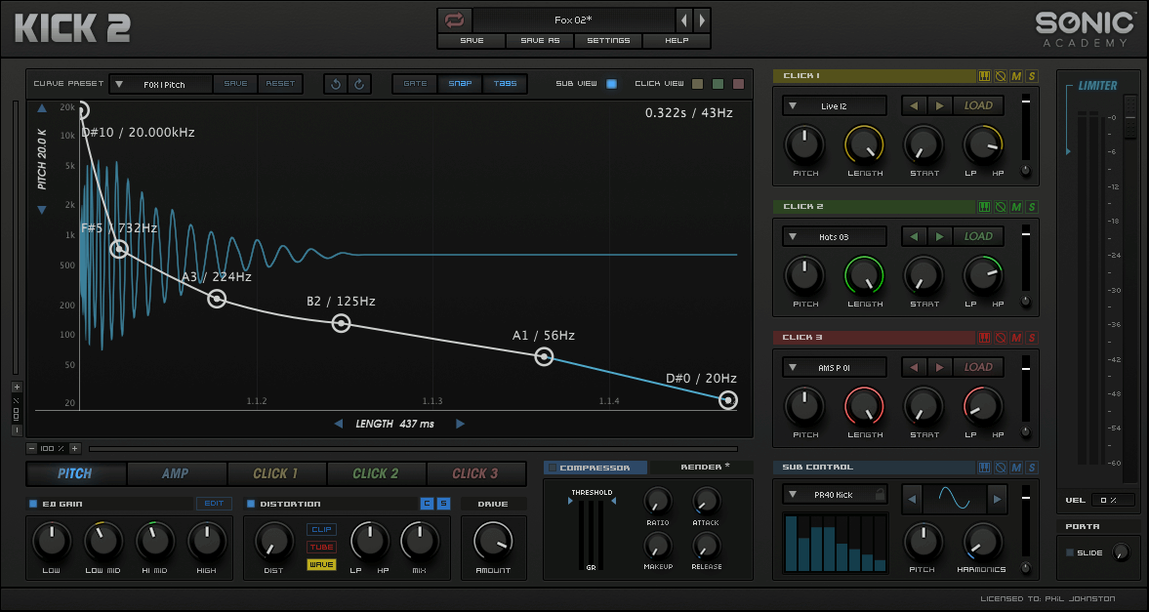
Three click areas shape the beater hit: attack, character and body, each on its own. The sub section goes beyond a sine wave with other waveforms for the fundamental.
More than 230 presets to start from. EQ, compression, limiting and distortion are built in for the transient and the tail.
Sub-first design
Open it on a fresh MIDI track. Load a preset, any preset, then bypass it.
Turn off the click section entirely. Work the sub first. Drag the pitch down until the weight sits right against the bassline. Adjust the decay so the tail breathes without dragging. Switch from sine to triangle if you need a duller thud that stays out of the way.
Now bring the click back. Start with the attack band—narrow, high, just enough to cut through a dense mix. Add a sliver of body, no more than a few clicks, until the knock feels physical. Leave the character band neutral for now; it is easy to over-sculpt and lose the snap.
Move to the distortion section. Try the first algorithm at low drive. Crank the drive briefly to hear what it does to the transient, then pull it back until only a hint of grit remains. Skip the EQ for a moment. Hit the compressor and watch the gain reduction flicker. Light ratio, fast release.
Render the kick to audio. Drop it into a break. If it fights the sub-bass, nudge the main pitch up two semitones and shorten the decay by a few milliseconds. That is usually enough.
Smeared transient stack
Stacking all three click bands at once. The result is a smeared transient with no definition. Pick one band to lead; the others support or stay muted.
Neglecting the sub waveform. Beginners treat it as a fixed sine and never explore the alternatives. A triangle or square gives you a very different starting weight before you touch the EQ.
Overdriving before compressing. Distortion after the dynamics section hits the transient unevenly. Place the compressor last in the chain if you want predictable punch.
Chasing the preset list instead of building from silence. Flipping through 230 presets without adjusting the decay or pitch to the track wastes time. Start blank once you know three or four core shapes.
Quiet details
The click-band solo buttons. You can isolate the attack, body or character with one click, without muting the others manually. Useful when dialing in the exact frequency range for the beater.
Dragging a numeric value while holding Shift for fine control. Easy to miss, essential for the decay knob where a millimeter changes the feel.
The sub oscillator's phase reset. It keeps the low end consistent on every hit, which matters when layering with a sampled bass that also resets phase. Inconsistent phase gives you cancellations that change per note.
The factory limiter is on by default in many presets. Bypass it while shaping; engage it only at the end to catch peaks. Otherwise you design into a ceiling you cannot hear.
If you acquired a kick 2 vst mac build, the included activation instructions walk through a quick offline step. No online account needed. For those exploring a kick 2 torrent or a kick 3 torrent, version 1.1.1 remains the stable Intel-native choice; kick 3 mac torrent builds require Apple Silicon and a different workflow. A kick 2 vst free download mac package typically bundles the same 230 presets and the full effects chain described here.
You start with silence and end with a kick.