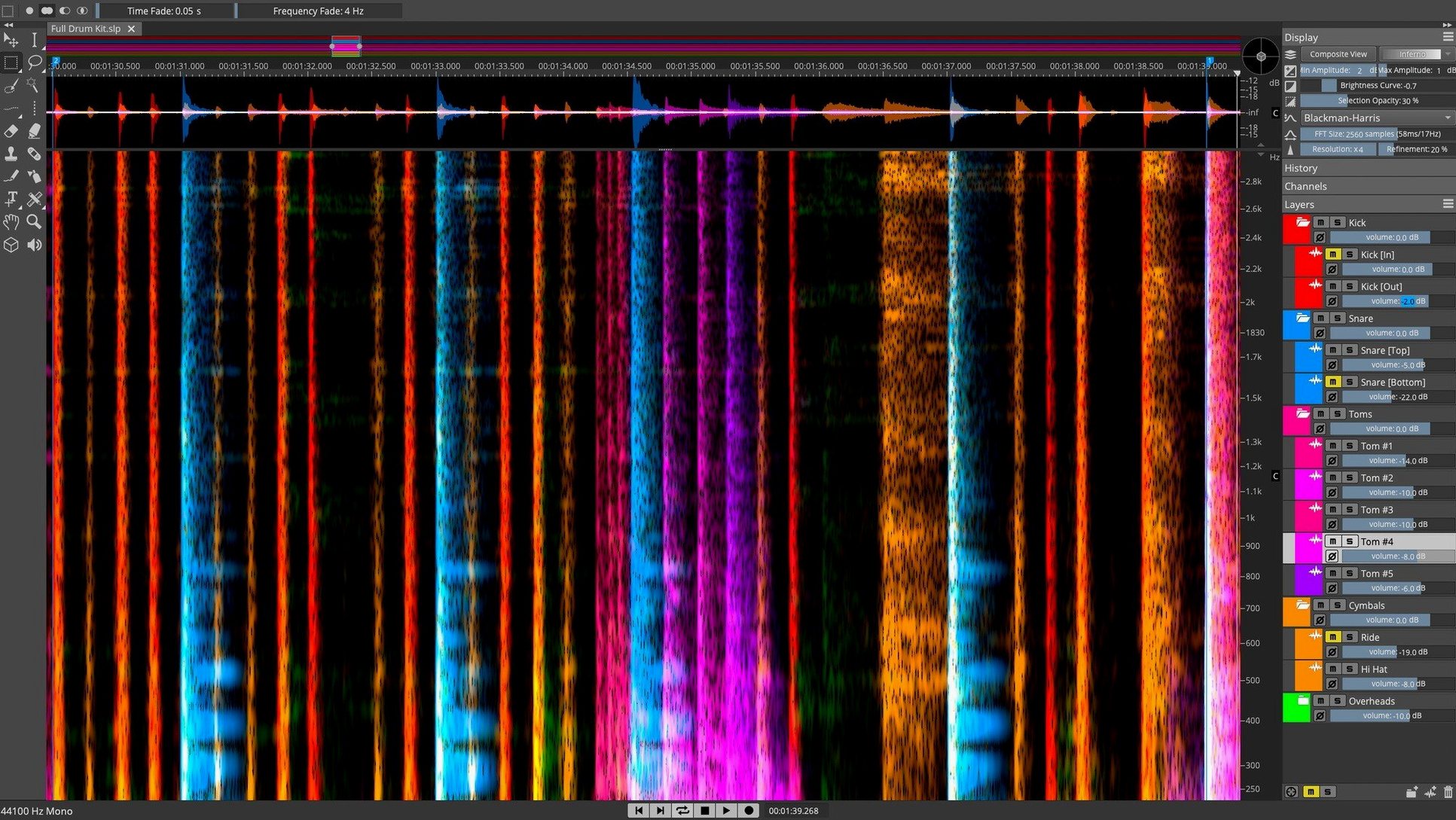
If you use iZotope RX, you know the feeling of reaching into a recording to lift out a hum or a chair squeak. SpectraLayers goes further and shows sound as a spectral map you edit directly.
AI unmixing splits a mix into layers. The voice denoiser pulls speech out of noise. De-essing handles sibilance automatically or by hand.
Dialogue cleanup
Post-production engineers working with dialogue and location sound. The voice denoiser and the spectral display turn hours of cleanup into minutes of targeted retouching. You see the noise and lift it out.
Music producers who receive mixed stems rather than full multitracks. AI unmixing lets you isolate a vocal, a bass line, or a drum part from a stereo file. Not perfect every time, but close enough to remix or sample.
Sound designers who need to extract a single event from a dense recording. Find a door slam, a glass clink, a footstep. Pattern Finder locates similar events across the spectrum so you can grab them all at once.
Learn on known audio
Start with a file you already know well. A recording where you remember exactly where the problem lives. That familiarity lets you focus on the tool, not the material.
Resist the urge to unmix everything. Pick one layer you actually need. Isolate it. Listen in solo. Then decide if the extraction is clean enough for your purpose.
Learn the display before the tools. Zoom into the low end of a vocal and watch how breath, sibilance, and room tone occupy different frequency bands. Once you can read the map, editing becomes fast.
Rotate to find noise
The 3D view is not just for show. Rotating a spectral slice often reveals harmonics that sit directly on top of noise — visible in 3D, nearly invisible in 2D.
You can set custom ranges for the de-esser instead of relying on presets. A narrow band between 5 and 8 kHz catches most sibilance on a female voice without dulling the top end.
When using Pattern Finder, select a quiet section of noise floor first. The algorithm works better when you give it a clean sample of what you want removed, rather than a complex event.
ARA 2 integration with Cubase and Nuendo means your SpectraLayers edits update instantly in the DAW timeline. No bouncing, no re-importing. If you work outside those hosts, a quick render-and-replace habit keeps things moving.
Layers you unmix stay independent until you export. You can mute a stem, process it separately, or adjust its level before committing. That flexibility saves re-doing extractions later.
Repair, and shaping at the source. macOS 12 or newer, Intel and Apple silicon.