
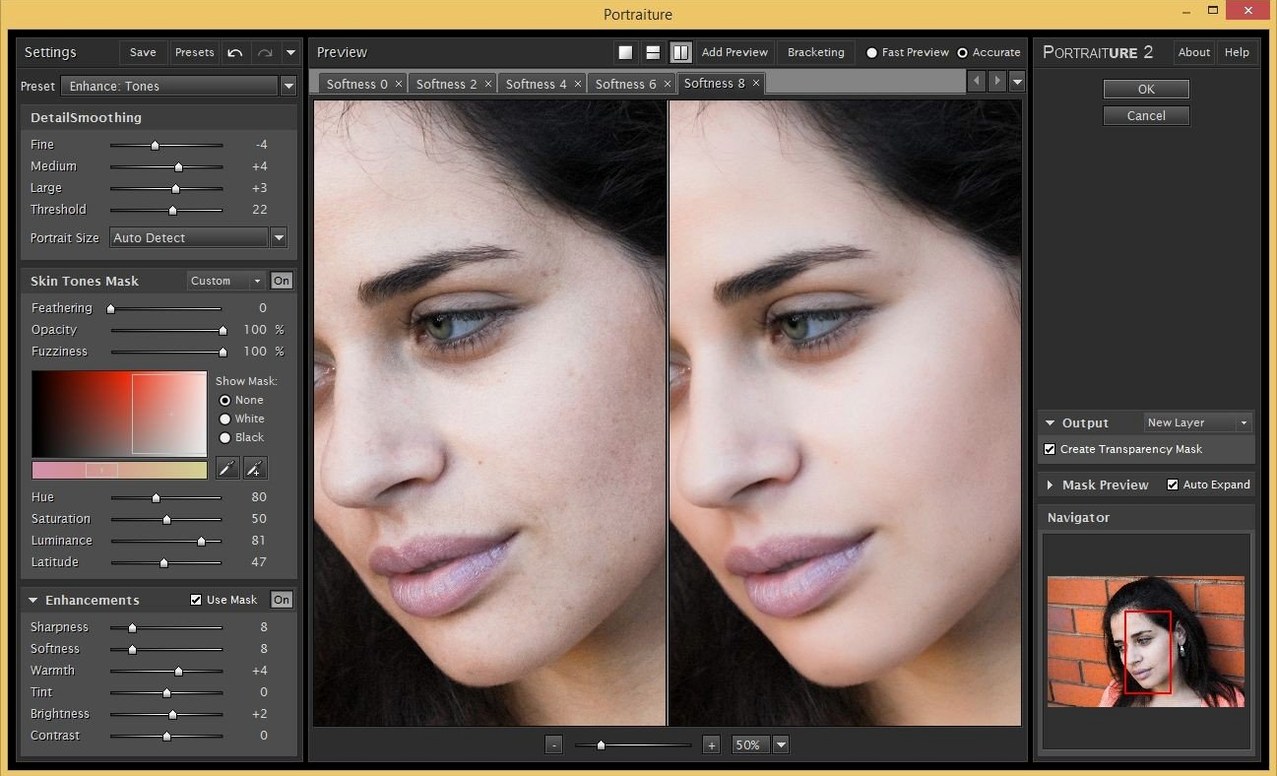
Portrait and wedding photographers reach for it when they want skin that still looks like skin—just with the busywork removed. The plugin lives inside Photoshop and Lightroom Classic. If you just installed it, here is where to begin.
- Open a well-lit portrait. Skip the backlit shot for now.
- Zoom to 100% on the face. The preview needs real pixels.
- Drag the Smoothing slider to 0, then creep it up until the texture softens but pores remain.
- Click the mask preview. See what the engine actually touched.
- Paint black on the eyes and mouth with the built-in brush. Keep those sharp.
Portrait and wedding photographers get the most from Portraiture—the ones who edit dozens of faces a session and would rather not spend that session painting masks. The plugin earns its keep when you stop thinking of it as a filter and start treating it as a first pass. Run it, then spend five seconds with the brush to protect lips and lashes. Done.
Headshot photographers like it too. Corporate work means five minutes per person, not thirty. Portraiture cuts that time with no visible cost to skin texture.
Retouchers who work in Affinity Photo can also use it; the plugin loads there as well, though most people run it inside Photoshop.
High-volume editors chasing a portraiture 4 mac workflow often pair it with a pen tablet. The brush feels immediate—wipe away smoothing from a jawline or a shirt collar in one stroke.
Landscape shooters won’t care. This is a portrait tool, full stop.
In use
A wedding photographer returns from a Saturday shoot with 400 frames. The bride’s skin looks fine at screen size, but zoom in and you see the heat, the long afternoon. Under each eye, a little texture. Across the forehead, a shine line.
She opens one photo in Photoshop. Portraiture analyzes the face and applies a default smoothing preset. She pulls the Threshold slider back slightly—just enough that pores stay visible on the cheek. The mask preview shows the engine missed the inner corner of one eye. Two brushstrokes fix it.
She saves the settings as a preset named “Bride morning light” and applies it to the other 399 frames via batch. By the time her coffee cools, the set looks consistent. No plastic skin. No manual masking.
That’s the kind of session where portraiture for mac free of repetitive masking becomes a reality, not a bullet point.
Sharpness trick
Start in the Details panel. The Smoothing slider is obvious, but the Sharpness and Warmth controls underneath are more important than they look. Sharpness at +10 keeps eyelashes crisp without reintroducing texture. Warmth nudged toward cool prevents the pinkish cast that heavy smoothing can leave on pale skin.
Next, check the mask. Hit the little mask icon. The black-and-white view shows exactly where the effect lands. If it bleeds onto clothing or hair, tighten the Tonal Range sliders. Narrow the highlights and shadows until the engine ignores the background.
Finally, save a preset for each common lighting condition. Window light. Flash. Overcast outdoor. You will reuse them more than you expect. People hunting a portraiture 3 torrent often miss that presets are the real time-saver—not the slider values, but the consistency across a whole job.
Missing plugin
Plugin not showing up in Photoshop. Portraiture installs two separate builds: one for Photoshop, one for Lightroom Classic. If you installed the Lightroom build, Photoshop will not see it. Re-run the installer and pick the right host. The disk image contains both.
Masks grabbing the background. The engine sometimes reads a textured wall or a patterned shirt as skin. Pull the Shadows slider in the Tonal Range inward. That usually drops the background out of the mask.
Preview lag on large files. On a 50-megapixel raw, the preview can stutter. Zoom to a tighter crop—say 50% instead of 100%—while you dial in settings. The final render will still process at full resolution.
Effect looking too plastic. Smoothing is not the only control. Raise Sharpness to +15 and push Warmth slightly cool. Skin keeps its texture and loses the wax-figure look. If you are testing a portraiture crack for mac, this is the first thing that feels off—settings shipped at zero often look overdone.
Lightroom Classic not recognizing the plugin. Open Lightroom, go to Preferences > External Editing, and check the Additional External Editor preset. Point it to the Portraiture application file directly. That usually resolves it.
Most problems come down to masks going where they should not. The fix is almost always in the Tonal Range section. Learn those three sliders and the rest falls into place.
One pass, one face. Learn the rhythm before you batch.